Google Messages Rolls Out Swipe for Timestamps and Redesigned Reply Gesture in Major UI Update
Google Messages rolls out a major redesign introducing swipe-to-reveal message timestamps, an upgraded reply gesture, and a cleaner chat UI. Here is what has changed and how to enable it.
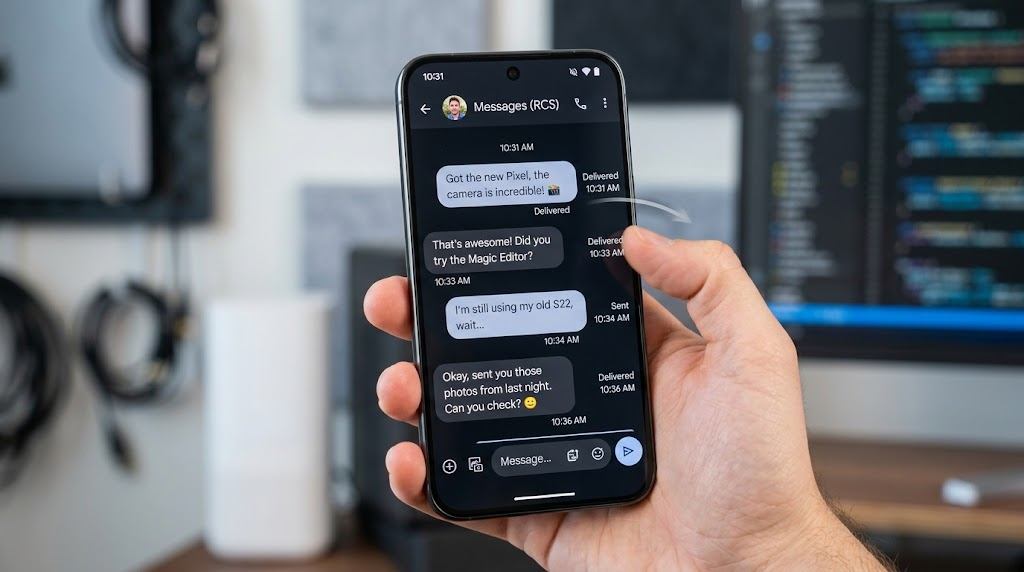
Google is rolling out a significant user experience redesign to its default Android communications client, introducing an intuitive swipe-to-reveal gesture for message timestamps alongside refined conversational reply mechanics across Google Messages.
The overhaul addresses one of the longest-standing usability complaints among Android users: the friction involved in verifying the exact minute a message was sent or delivered. Historically, reading detailed message delivery data in Google Messages required long-pressing an individual chat bubble and opening the top-level overflow menu. With the latest production release, users can now drag any chat bubble leftward to reveal instant delivery metadata, bringing the platform closer in parity to iOS Messages and leading third-party chat clients.
Gesture Redesign: Swipe for Timestamps and In-Line Replies
The update restructures how users navigate active RCS (Rich Communication Services) and SMS threads. Under the new gesture framework, directional swipes trigger distinct actions without interfering with conversation flow:
Core Gesture Changes in Google Messages
- Leftward Swipe (Timestamps): Swiping left on any point within the message history temporarily slides the entire conversation column, revealing precise timestamps along the right-hand margin. Releasing the screen snaps the bubbles back into alignment.
- Rightward Swipe (Direct Reply): Swiping a specific chat bubble to the right now anchors that exact message into an active in-line quoted reply above the text input bar.
- Haptic Feedback Integration: Both actions trigger subtle tactile feedback when the gesture threshold is reached, preventing accidental triggers during standard vertical scrolling.
This gesture refinement forms part of a broader layout adjustment. Recent client teardowns indicated that Google has been systematically de-cluttering the message canvas, repositioning camera and voice note buttons, and optimizing the attachment picker to accommodate dynamic screen sizes on foldables and tablets.
Feature Comparison: Old vs. New Interaction Architecture
The transition significantly streamlines navigation across high-frequency conversational threads:
| Interaction Target | Legacy Workflow | New Redesigned Framework |
|---|---|---|
| Inspect Message Timestamp | Long-press bubble → Tap 'View Details' menu | Quick leftward swipe anywhere on screen |
| Trigger Quoted Reply | Double-tap or context menu selection | Single rightward flick on target bubble |
| Screen Clutter | Persistent delivery subtexts below bubbles | Dynamic hidden metadata revealed on demand |
Rollout Schedule and How to Check Availability
The feature set is currently deploying through a staged server-side push tied to the latest stable Google Play Store release. While open beta enrolled accounts received early previews of the gesture code, broader public availability is expanding across Pixel, Samsung Galaxy, and global Android devices over the coming days.
To verify if the feature has activated on your device:
- Open the Google Play Store and ensure Google Messages is updated to the latest build.
- Launch any active RCS chat thread.
- Place your thumb on the right side of the screen and slide gently to the left. If timestamps emerge beside your chat bubbles, the server-side flag has been enabled for your Google account.
Related Coverage & Trending Stories
- → Student Loan Deadline: How to Claim the 1% Interest Rate Reduction Before September 30
- → Boeing 787-9 Diverted to LAX: American Airlines AA167 Emergency Landing Explained
- → Admiral Redundancies: 500 UK Insurance Jobs Cut in £100M Restructuring Plan
- → US Business Activity Surges to 58.4 PMI in September: Output Expands at 5-Year High
- → Veronika Grimm Warns of European Gas Supply Illusion: German 'Economic Sage' Urges Caution
- → Explore Full TrendSpike News Archive →
TrendSpike Editorial Team
Staff Research & Technical AnalysisIndependent research covering distributed cloud systems, modern enterprise software engineering, and macro-financial policy. Our technical and financial analyses reference primary documentation, official regulatory filings, and benchmark architectures.